How to Use a Halloween Multiplication Codebreaker at Home or in Class
Get the free Halloween multiplication codebreakers. Choose Basic or Mixed, with an optional separate answer key. No ads or sign-up.
Two difficulty levels, a simple checking routine, and ways to keep the attention on the maths
A multiplication codebreaker gives each answer a second job: it supplies a letter for a hidden message. That creates a useful question for the adult running the activity: is the learner solving the facts, or guessing the words?
Here is a way to use the puzzle while keeping the multiplication visible. I’m the creator of Get Math Worksheets, which includes the Halloween activity described below. These are suggestions for using it, rather than findings from a classroom trial.
Choose the facts before the theme
Start with multiplication facts the learner has already encountered.
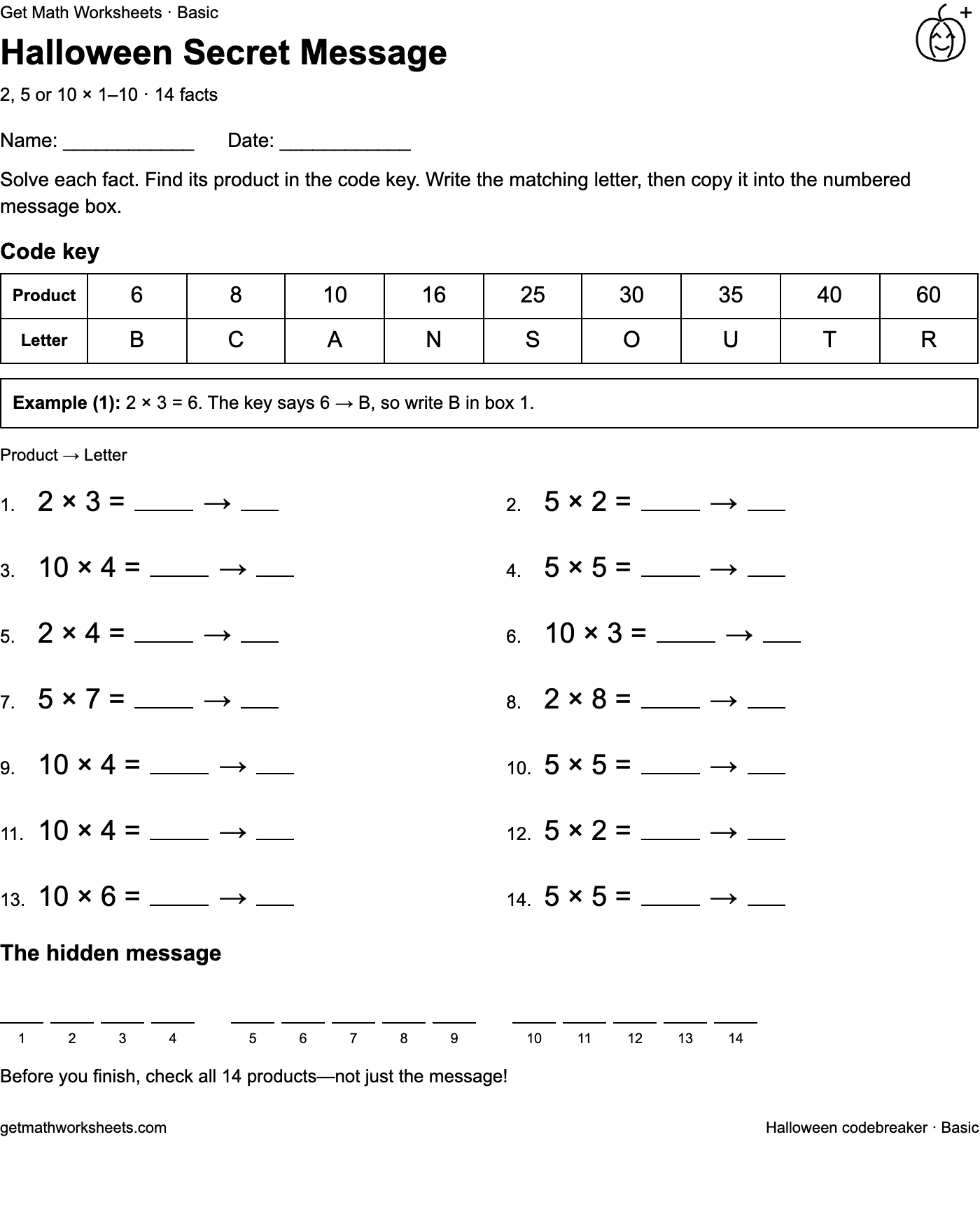
The Basic codebreaker uses 2, 5 or 10 as the first factor and numbers from 1 to 10 as the second. The Mixed codebreaker uses numbers from 2 to 9 for both factors. Each has 14 facts, including a worked example, a product-to-letter key and numbered blank message boxes.
Choose Basic when those three tables are the current focus. Choose Mixed when the learner is ready to practise across the wider range. Both versions can sit at the same classroom station, with learners using the version that fits their current work. At home, look through a few facts together before choosing.
Explain the route from fact to letter
Use the printed example to demonstrate the whole sequence:
- Solve the multiplication and record the product.
- Find that product in the code key.
- Write its matching letter beside the fact.
- Copy the letter into the message box with the same question number.
On Basic, the example is 2 × 3 = 6, and 6 corresponds to B. Ask the learner to point to the matching number in the key before writing the letter. That separates finding the product from looking up the code.
Students should still record the example’s answer and letter. A solved message should have a complete trail of calculations behind it.
Adjust the support
If a learner stalls, offer counters, a sketch of equal groups or a multiplication chart. Ask how the support helped them find the answer. For example, 5 × 7 can be represented as five groups of seven, or worked out by counting in fives seven times.
In pairs, one learner can calculate while the other checks the code lookup; then swap roles. Give each learner a sheet so that both record their work. If the page feels crowded, cover the lower questions with scrap paper and reveal them gradually.
Keep checking separate from guessing
A recognisable message is a useful clue, but it does not confirm every calculation. Check all 14 products, then check the letters and their positions.
If something is wrong, trace one box backward: which question supplied this letter, which product was recorded, and does that multiplication hold up? This gives you a specific place to help.
Keep the separate answer page aside until checking. Afterwards, ask the learner to explain one fact they found tricky and one they could solve another way.
Print once before making copies
Choose US Letter or A4 on the activity page, then match that paper size in the browser’s print dialog. Use 100% scale, turn off browser headers and footers, and inspect the preview. The worksheet prints in black and white.
Select “Include answer key when printing” only when you want the separate answer page. Viewing the answer preview alone does not add it to the printout. You can also choose Save as PDF in the print dialog.
Give finishers a different question
Ask a finisher to write a division fact for three completed multiplications, draw an array for one, or find a second multiplication with the same product. Changing the explanation keeps the work connected to the original facts.
The two codebreakers have fixed messages, so refreshing will not create a new puzzle.
The free activity is available at Halloween multiplication activity with no ads or sign-up. You can also use the same solve, record, decode and check routine with a codebreaker you make yourself.
By QIan Li, creator of Get Math Worksheets. Prepared with AI assistance.
Comments
Post a Comment